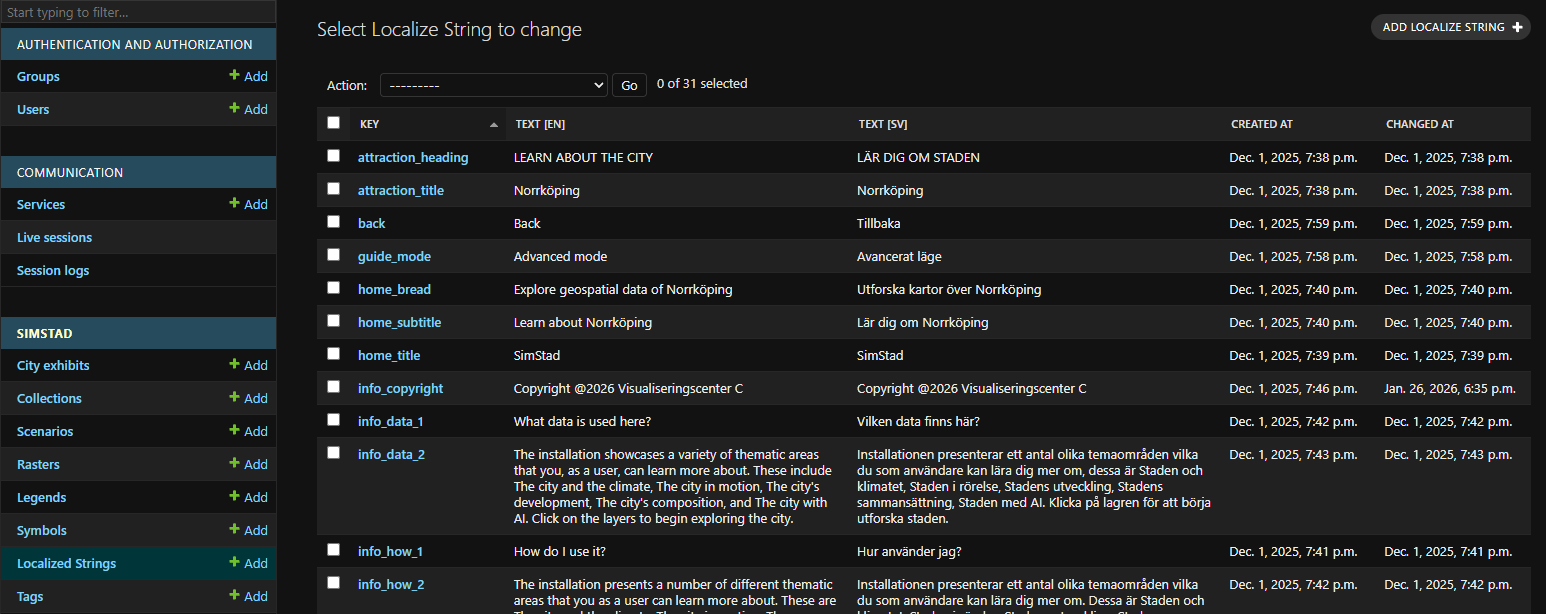
Localized Strings
Contributors

Funding


Localized Strings
Localized Strings contain shared Interface text that does not belong to a specific City Exhibit, Collection, Scenario, Raster, or Legend. They cover navigation labels, attraction mode, the information dialog, and the default text shown on surrounding Legend screens.
The current Interface expects particular keys but Omni does not create them automatically. Add every key used by your Interface build before testing a new installation.
Fields
After creating a new Localized String under Simstad > Localized strings in Omni Admin, add its details here.
| Field | Description |
|---|---|
| Key | Identifier requested by the Interface. Enter it exactly as documented below. |
| Text (English/Swedish) | Text returned for the selected Interface language. Adapt both versions to the installation. |
Interface keys
General navigation and home
| Key | Purpose |
|---|---|
attraction_heading | Invitation or instruction displayed in attraction mode. |
attraction_title | Place or exhibit name displayed in attraction mode. |
back | Label for returning to the previous view. |
guide_mode | Label for advanced or guide mode. |
home_bread | Short contextual line introducing the home screen. |
home_subtitle | Supporting home-screen introduction. |
home_title | Main exhibition title on the home screen. |
map_hint | Instruction inviting the visitor to touch the map. |
page_layer | Heading for the advanced data-layers page. |
Information dialog
| Key | Purpose |
|---|---|
info_title | Title of the installation information dialog. |
info_welcome | Short welcome phrase shown near the title. |
info_pitch | Summary of the installation's purpose and intended audiences. |
info_how_1 | Heading for instructions on using the installation. |
info_how_2 | Explanation of the visitor interaction and available themes. |
info_data_1 | Heading introducing the datasets or themes on display. |
info_data_2 | Description of the datasets, themes, or topics visitors can explore. |
info_model_1 | Heading introducing the geographic area or physical model. |
info_model_2 | Description of the represented area and why it was selected. |
info_who_1 | Heading for data creators, providers, or project partners. |
info_who_2 | Explanation of who produced the model and underlying data. |
info_rights_1 | Heading for rights, ownership, and attribution. |
info_rights_2 | Data ownership, licensing, and attribution statement. |
info_software_1 | Heading introducing the software and technical implementation. |
info_software_2 | Plain-language description of how the installation was built. |
info_copyright | Copyright notice for the installation. |
info_qr | Label for the documentation link or QR code. |
Default Legend screens
These strings are shown when the surrounding screens are not displaying a specific Scenario Legend.
| Key | Purpose |
|---|---|
legend_default_title | Welcome heading for the default Legend page. |
legend_default_bread | Short explanation of what visitors can explore. |
legend_default_left | Directional instruction for the screen positioned to the left of the visitor Interface. |
legend_default_forward | Directional instruction for the screen opposite the visitor Interface. |
legend_default_right | Directional instruction for the screen positioned to the right of the visitor Interface. |
Write each directional instruction from the visitor's viewpoint and verify it at the physical table. See Omni and Legends for the screens that display this content.