Services
Contributors

Funding

Services
A Service is an isolated WebSocket communication channel in Omni. It provides separate credentials for a host and its clients. In SimStad, the Unreal Engine application is the host and the visitor Interface is a client.
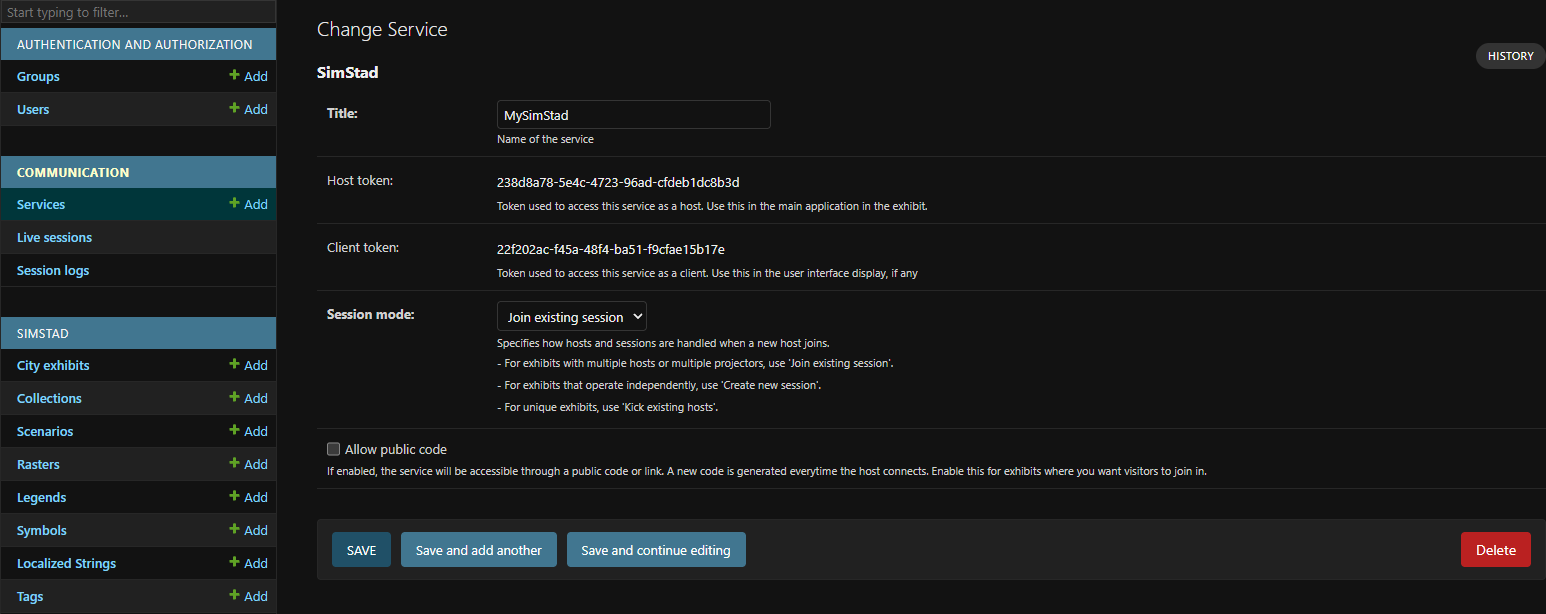
Create one Service for each independent exhibition. The generated client token is used as OMNI_TOKEN in the Interface's config.json. Configure the Unreal Engine application with the host token from the same Service. Treat both tokens as credentials and do not publish them.
Create a Service
Open Communication > Services in Omni Admin and select Add Service.
| Field | Description |
|---|---|
| Title | A unique, descriptive name for the communication channel. |
| Session mode | Controls what happens when a host connects to the Service. For a permanently installed SimStad exhibit, use Join existing session so the Interface can remain connected while Unreal Engine is offline or restarting. |
| Allow public code | Generates a short code that guests can use to join. SimStad does not require guest access, so leave this disabled unless you are building a separate audience-participation experience. |
After saving, Omni generates a host token and client token. Copy each token to the appropriate application configuration.
The available session modes are:
| Mode | Behavior |
|---|---|
| Kick existing hosts | Keeps one host in the session and disconnects an existing host when another joins. |
| Join existing session | Allows hosts and clients to return to the same persistent session. Recommended for SimStad. |
| Create new session | Creates a separate session whenever a host connects. Use this for independent, temporary sessions rather than a permanent exhibit. |
See the general Omni guide for connection messages, authentication, and the WebSocket protocol.
Live sessions and logs
Live sessions show Services that are currently in use. Check this page when diagnosing whether the Interface or Unreal Engine application has connected successfully.
Session logs contain completed sessions, including their start and end times and the numbers of connected clients and exchanged messages. They can help identify unexpected disconnects or periods when an exhibition was inactive. These records are generated automatically and do not need to be configured.
Next, assign the Service to a City Exhibit.